You’re going to make two API calls in Python, with the same long system prompt and two different user messages. On the second call you’ll watch 99% of your input tokens get served from cache at a steep discount. About five minutes of work, a couple of cents of API credits.
I’ll use OpenAI’s gpt-5.4-mini directly. The same mechanic works on every modern OpenAI chat model.
What you’ll need
- Python 3.10+ and the
openaiSDK (pip install openai>=1.50) - An OpenAI API key in your shell:
export OPENAI_API_KEY=sk-...The demo
We need a long, stable document for the model to answer questions about. The full text of Alice’s Adventures in Wonderland from Project Gutenberg works perfectly — public domain, ~38,000 tokens, way above OpenAI’s 1,024-token caching threshold.
import json
import time
import urllib.request
from datetime import datetime, timezone

from openai import OpenAI

client = OpenAI()
MODEL = "gpt-5.4-mini"

# Per-run marker. Forces a unique prefix every time you run this script,
# so the first call is guaranteed to be a true cold start (cached_tokens: 0)
# and the second is guaranteed to hit the cache.
RUN_MARKER = f"[Run: {datetime.now(timezone.utc).isoformat()}]"

doc = urllib.request.urlopen(
    "https://www.gutenberg.org/cache/epub/11/pg11.txt"
).read().decode()

system = (
    f"{RUN_MARKER}\n\n"
    "You answer questions about the document below, using only the document.\n\n"
    f"{doc}"
)

def ask(question):
    resp = client.chat.completions.create(
        model=MODEL,
        max_completion_tokens=60,
        messages=[
            {"role": "system", "content": system},
            {"role": "user",   "content": question},
        ],
    )
    return resp.usage.model_dump()

print("=== Cold call ===")
print(json.dumps(ask("What was the White Rabbit holding when Alice saw it?"), indent=2))
time.sleep(2)
print("=== Warm call ===")
print(json.dumps(ask("What did Alice find on the little table after she fell?"), indent=2))
Run it. You should see something like:
=== Cold call ===
{
  "completion_tokens": 35,
  "prompt_tokens": 41403,
  "total_tokens": 41438,
  "completion_tokens_details": {
    "accepted_prediction_tokens": 0,
    "audio_tokens": 0,
    "reasoning_tokens": 0,
    "rejected_prediction_tokens": 0
  },
  "prompt_tokens_details": {
    "audio_tokens": 0,
    "cached_tokens": 0
  }
}

=== Warm call ===
{
  "completion_tokens": 17,
  "prompt_tokens": 41404,
  "total_tokens": 41421,
  "completion_tokens_details": {
    "accepted_prediction_tokens": 0,
    "audio_tokens": 0,
    "reasoning_tokens": 0,
    "rejected_prediction_tokens": 0
  },
  "prompt_tokens_details": {
    "audio_tokens": 0,
    "cached_tokens": 41216
  }
}
What just happened
The cached_tokens: 41216 on the second call is the headline. 99.6% of your input tokens were served at the discounted cache-read rate — for gpt-5.4-mini that’s about 10% of standard input pricing, so the input portion of the warm call drops to a small fraction of what the cold call cost. Output tokens still bill at full rate.
Two things to notice about what changed and what didn’t:
- The system prompt — run marker + instruction + the entire book text — is identical between calls. That’s the cacheable prefix.
- The user message changed. That’s why
cached_tokensis 41,216 instead of the full ~41,400: caching always lands on a multiple of 128 tokens (the cache’s storage granularity), and 41,216 = 128 × 322 is the largest multiple of 128 that fits inside the stable system-prompt portion. Everything past that boundary — the tail of the system prompt that didn’t fit cleanly, plus the entire user message — bills at full input rate.
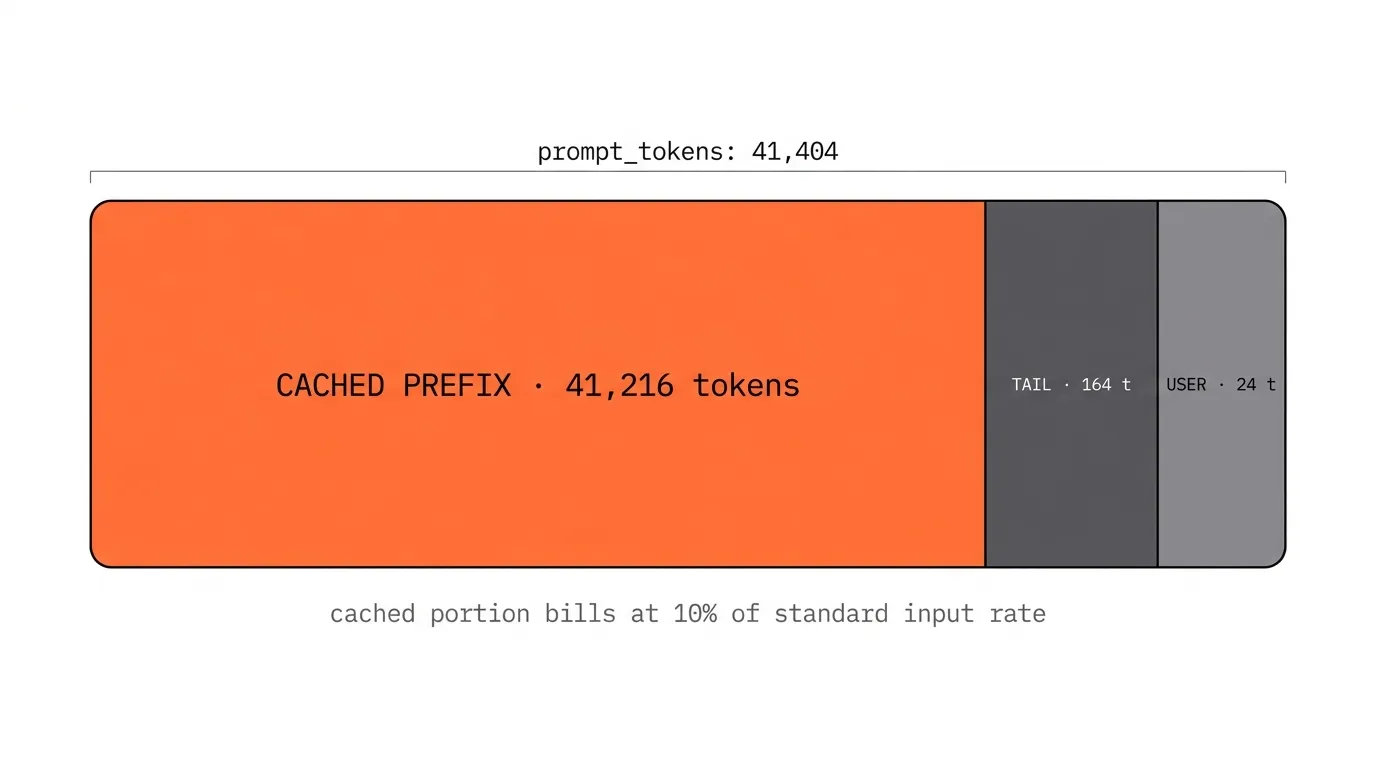
The TAIL zone is the leftover 164 tokens at the end of the system prompt — still stable bytes that match between calls, but they don’t fit cleanly into another 128-token cache chunk, so they bill at the full input rate alongside the user message. A small rounding-noise tax that’s invisible at 41K tokens of prefix but more meaningful for prompts hovering near the 1,024-token caching floor.
What’s actually happening under the hood: when the model processes your prompt, every attention layer computes a key (K) and value (V) vector for each input token. These depend only on the bytes of the prompt and the model weights, so two requests that start with identical bytes produce identical K/V vectors for that prefix. The inference cluster keeps those vectors in fast memory for a few minutes. The second request skips the recomputation and starts generating from where the cache leaves off. No semantic similarity, no embeddings — just a literal prefix-byte hash.
Why the run marker is there
The RUN_MARKER line at the top of the system prompt is doing real work. Without it, re-running the script within ~5 minutes hits OpenAI’s still-warm cache on both calls — you’d see cached_tokens: 41,216 on the cold call too, and the transition would disappear.
Prepending a unique timestamp shifts the prefix bytes on every run, guaranteeing the cold call has never been seen before. This is the same mechanic that, when accidentally injected into a production system prompt, silently destroys cache hit rates. Engineers add the current time, a request ID, or a user identifier to the top of their system prompt “for context,” and unintentionally turn one cacheable prefix into N. Here we’re using it deliberately. In production, you want the opposite — keep the prefix byte-stable and put all per-request variation at the end.
Where this matters
Caching only discounts the stable prefix. Output tokens always bill at standard rates. So the leverage scales with what fraction of your bill is the prefix.
- Tiny prompts (under 1k tokens). OpenAI’s automatic caching doesn’t even engage. Don’t bother architecting around it.
- Large stable system prompt + short user input + short output. Classic extractor or RAG-over-document pattern. Caching cuts the bill 60–90%.
- Multi-turn chat and agent loops. The cacheable prefix isn’t just the system prompt — it’s every prior turn that’s still in context. By turn 10 of an agent, 95%+ of the input bytes are conversation history that’s already cached. Agents get cheap fast.
Plug your own prompt into the Prompt Cost Analyzer to see what the cache columns look like across the GPT-5 family on your specific workload.
References
- OpenAI — Prompt caching guide and API announcement
- The foundational systems paper on KV-cache architecture for production LLM serving — Kwon et al. (2023), Efficient Memory Management for Large Language Model Serving with PagedAttention.
Stay in the loop
The occasional email when there's something new worth sharing.